How to Bring Your Own IP to Google Cloud Platform?
Learn how to bring your AFRINIC-allocated IP addresses to Google Cloud Platform using BYOIP. This guide covers the process from ROA configuration to deploying addresses on Compute Engine, with practical insights for organizations in Mauritius and Africa using the South Africa (Johannesburg) region.

When migrating workloads to the cloud, one of the most overlooked challenges is IP address management. Organizations that have built their reputation, whitelists, and infrastructure around specific IP addresses often face a difficult choice: abandon those trusted addresses or maintain expensive on-premises equipment just to keep using them. This challenge is particularly relevant in Mauritius, where Internet leased circuit offerings remain "unfortunately" expensive, making it impractical for small networks to manage their own IP number resources on-premises. Google Cloud's Bring Your Own IP (BYOIP) feature solves this problem, and for organizations in Africa and the Indian Ocean region holding AFRINIC allocations, it opens up exciting possibilities.
This article is based on my experience managing a Public IP Address Prefix allocated by AFRINIC to the company I work for. I'll share the practical insights gained through this process, from understanding the Regional Internet Registry ecosystem to the actual implementation steps that made our IPv4 migration to Google Cloud seamless.
Understanding Regional Internet Registries and AFRINIC
Before diving into the technical bits, it's worth understanding where your IP addresses come from. I find that many developers and even sysadmins don't fully grasp the infrastructure that makes global Internet addressing possible.
The Internet's addressing system is coordinated through a hierarchical structure. At the top sits the Internet Assigned Numbers Authority (IANA), which allocates large blocks of IP addresses to five Regional Internet Registries (RIRs). These RIRs are nonprofit organizations that manage the distribution of Internet number resources within their geographic regions:
- AFRINIC (African Network Information Centre) — Africa and the Indian Ocean
- APNIC (Asia-Pacific Network Information Centre) — East, South, and Southeast Asia, plus Oceania
- ARIN (American Registry for Internet Numbers) — North America, parts of the Caribbean, and Antarctica
- LACNIC (Latin America and Caribbean Network Information Centre) — South and Central America
- RIPE NCC (Réseaux IP Européens Network Coordination Centre) — Europe, the Middle East, and Central Asia
AFRINIC is headquartered in Ébène, Mauritius — yes, right here on our island! It was established in 2004 and received ICANN's final recognition in April 2005, making it the youngest of the five RIRs. As a not-for-profit organization, AFRINIC serves approximately 2,400 members across 56 countries, including Internet service providers, Internet exchange points, governments, academic institutions, and businesses that operate networks.
For a company based in Mauritius holding a /24 Public Advertised Prefix from AFRINIC, this means you have 256 IPv4 addresses that are officially registered and recognized globally as belonging to your organization.
Why Bring Your Own IP (BYOIP) Matters to us (in Africa, particularly Mauritius)?
Google Cloud announced BYOIP in October 2019, becoming the first cloud provider to make this feature globally available across all its regions. However, here's the catch for us in Africa — while BYOIP was available globally since 2019, Google Cloud had no region on the African continent until January 2024, when the africa-south1 region (Johannesburg, South Africa) became operational. This was a significant milestone as it marked Google Cloud's first presence in Africa.
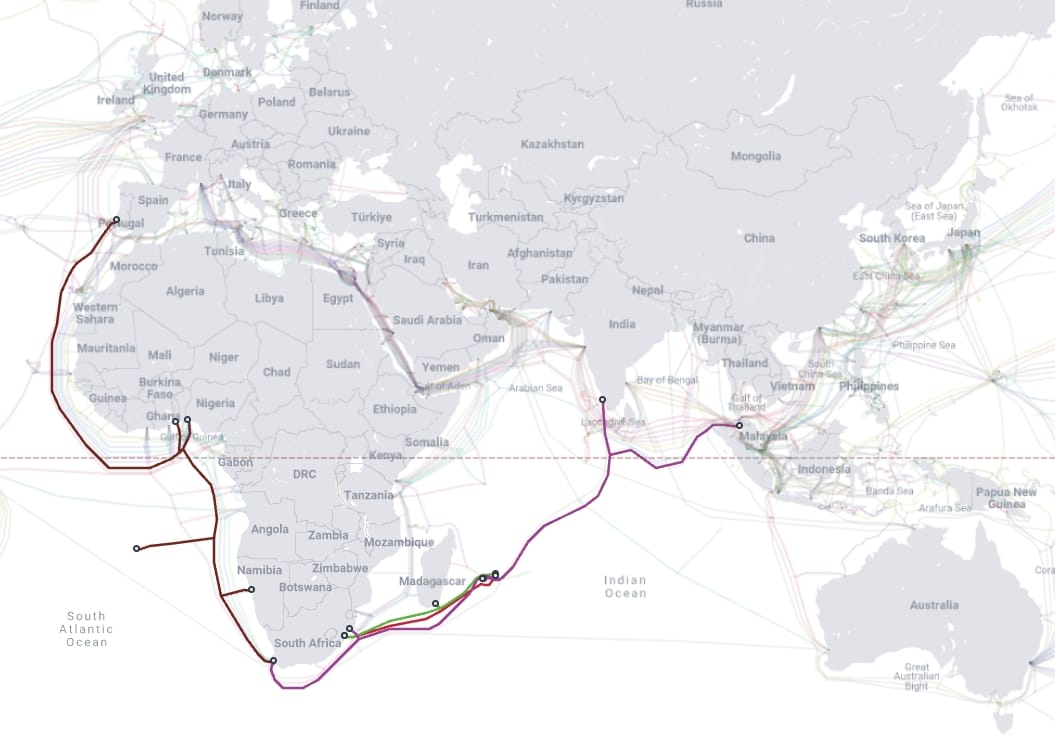
For organizations in Mauritius and across the AFRINIC region, this meant that for nearly five years, using BYOIP required routing traffic through distant regions like europe-west1 or me-west1 (Tel Aviv). Not ideal for latency-sensitive applications. The Johannesburg region changes everything — we now have a Google Cloud region connected to Mauritius via three submarine cables.
The BYOIP Architecture on Google Cloud
Google Cloud's BYOIP implementation revolves around two key concepts: the Public Advertised Prefix (PAP) and Public Delegated Prefixes (PDPs).
A Public Advertised Prefix is your IP address block as registered with Google Cloud. This is where ownership verification happens through Route Origin Authorization (ROA) and reverse DNS validation. After verification is complete, Google configures the announcement of this prefix to the Internet, but the prefix is not advertised until it is provisioned. The provisioning process takes approximately four weeks.
A Public Delegated Prefix is a subdivision of your PAP that you configure for use in a specific scope—either a particular region or globally. You can break up your PAP into multiple PDPs to distribute addresses across different regions or use cases. These PDPs can be further divided into sub-prefixes, giving you granular control over how your IP addresses are used.
Setting Up BYOIP
Let me walk you through how I configured our company's AFRINIC-allocated /24 prefix on Google Cloud. The process requires coordination between your Regional Internet Registry (AFRINIC in our case) and Google Cloud.
Prerequisites and ROA Configuration
Before touching the Google Cloud Console, you need to create a Route Origin Authorization (ROA) with AFRINIC. The ROA is a cryptographically signed statement that authorizes Google's Autonomous System Number (ASN) to advertise your IP prefix. Google uses ASN 396982 for BYOIP announcements.
The ROA must include your prefix range, Google's ASN, and an appropriate expiration date. This authorization is registered with the Resource Public Key Infrastructure (RPKI), which allows BGP routers worldwide to verify the legitimacy of route announcements.
I won't go into the details of creating the ROA on AFRINIC's portal here as it is purely textbook instruction. If you're an AFRINIC member, you should be familiar with their MyAFRINIC portal where the RPKI management is done.
Creating the Public Advertised Prefix
With the ROA in place, navigate to the VPC network section in Google Cloud Console. The process begins by creating your Public Advertised Prefix.
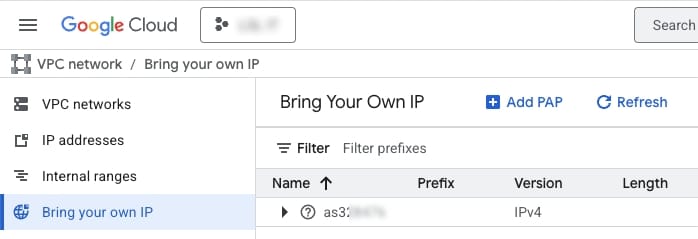
Click on "Add PAP" to start creating your Public Advertised Prefix. The first step requires you to enter details for the prefix you want to bring to Google Cloud. Notice the reminder about Route Origin Authorisation Verification — this is why we set up the ROA with AFRINIC beforehand.
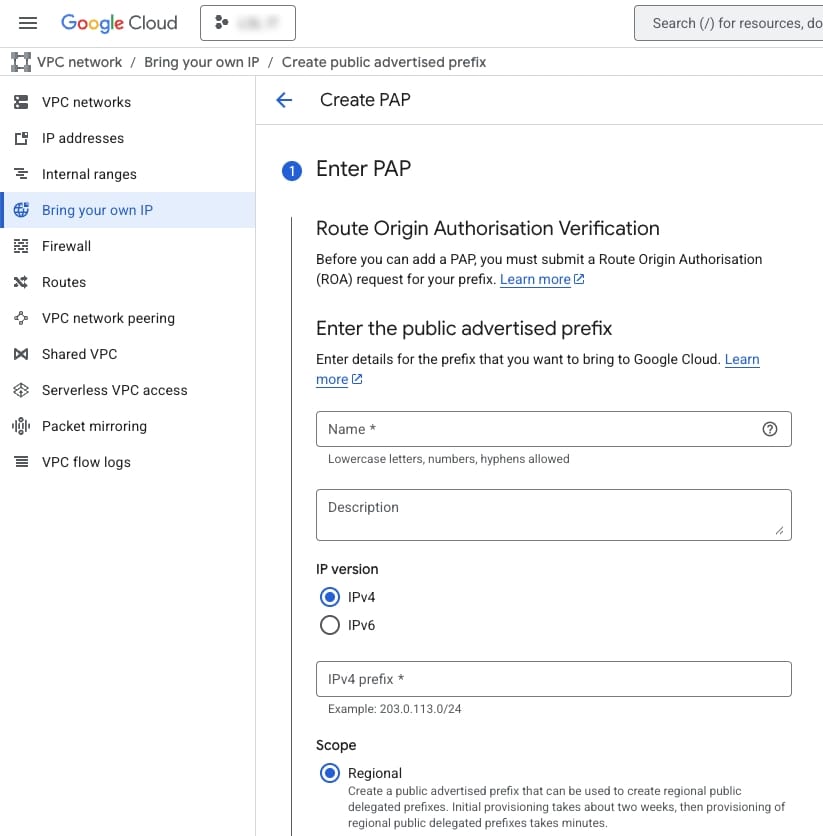
You'll need to provide a name for your PAP, select the IP version (IPv4 or IPv6), enter your prefix in CIDR notation, and choose the scope (Regional or Global). The form even shows an example format: 203.0.113.0/24.
After entering your prefix details, Google Cloud will ask you to confirm ownership. Pay attention to the warning here — this information cannot be edited later. Double-check that the net range and CIDR are correct before proceeding.
The final step is validation. Google Cloud verifies your ownership through two methods: DNS validation and Route origin attestation. For DNS validation, you'll need to create a PTR record using the IP address and name provided. The ROA validation checks against the RPKI to confirm that you've authorized Google's ASN to announce your prefix.
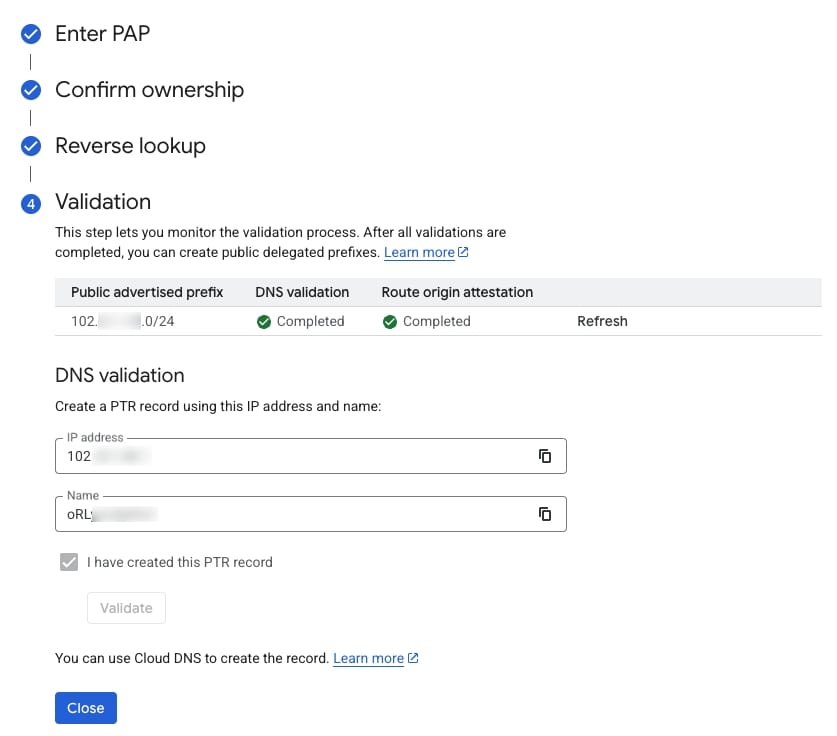
Once you've created the PTR record and your ROA is properly configured with AFRINIC, click the checkbox to confirm and hit Validate. When both validations show "Completed", you're good to go!
After validation completes, you'll see your PAP listed with "Prefix configuration in progress" status. This is where patience comes in.
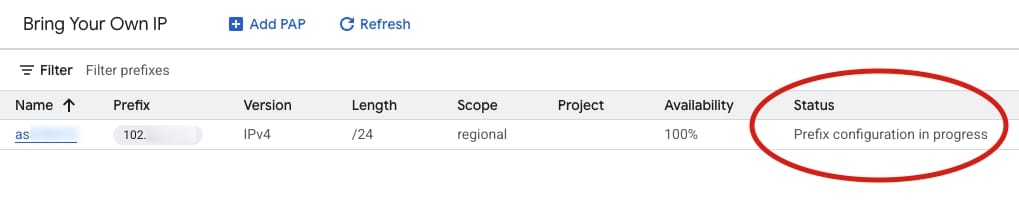
The full provisioning process takes about four weeks. This isn't Google being slow— it's the time needed for route propagation across global BGP infrastructure to ensure stable, reliable routing.
Once provisioning completes, the status changes to "Ready to announce". This is the moment you've been waiting for!

Click on the three-dot menu under Actions and select "Announce" to start advertising your prefix from Google's network.
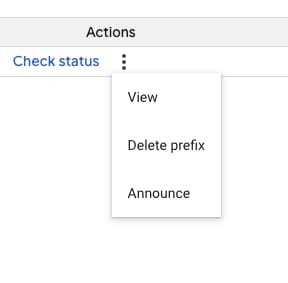
After announcing, your prefix will be advertised to the Internet from Google Cloud's infrastructure. You can now create Public Delegated Prefixes and start using your BYOIP addresses.
Creating Public Delegated Prefixes
While waiting for your PAP to provision, you can plan how to divide your address space. For a /24 prefix, you might allocate addresses for:
- A
/26for your primary regional workloads - A
/27for global load balancers - A
/28for development and testing - Reserve the remaining space for future use
Each Public Delegated Prefix needs a scope assignment. Regional scope is required if you want to use addresses with Compute Engine VMs or regional load balancers. Global scope is needed for global Application Load Balancers but requires your project to be on an allowlist.
Oh... and about region selection. My usual trick for obtaining the best latency to a region is to understand how our submarine fiber cables connect us to the rest of the world. With the africa-south1 region now available in Johannesburg, this is the obvious choice for organizations in Mauritius and across the AFRINIC region. The region is connected to Europe via the Equiano subsea cable and to Mauritius via the SAFE, METISS and T3 subsea cables.
Delegating Sub-Prefixes to Projects
Once your PDPs are provisioned, you can delegate sub-prefixes to specific projects within your organization. This is where BYOIP shines for enterprise environments—you can maintain centralized control over your IP address space while allowing individual teams to use addresses in their projects.
From the PDP details page, you can see all the information about your Public Delegated Prefix — the status (hopefully "Announced to Internet" ✅), the prefix details, scope, and any existing sub-delegates. Notice in the screenshot below that the scope is set to africa-south1.
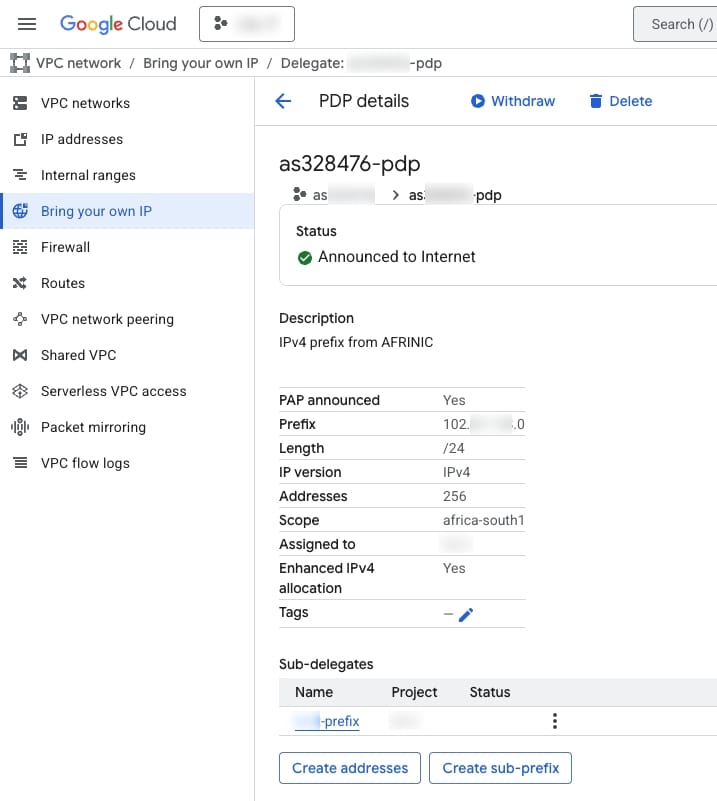
To create a sub-prefix, click on "Create sub-prefix". You'll need to provide a name, select the prefix length (how many addresses you want to delegate), choose the specific IP range, and assign it to a project.
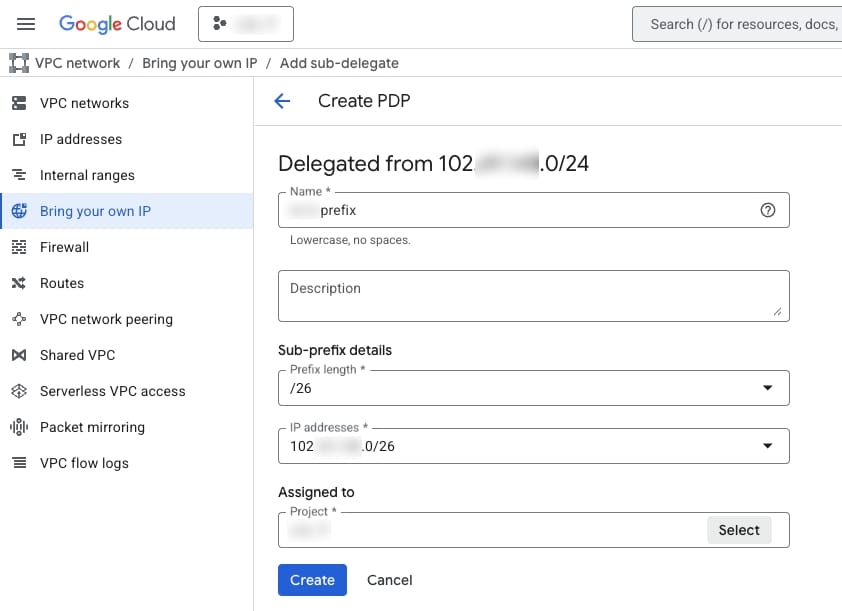
In this example, I'm creating a /26 sub-prefix (64 addresses) and assigning it to the "LSL IT" project. You can create multiple sub-prefixes of different sizes depending on your needs.
Once the sub-prefix is delegated to a project, you can create addresses from that pool. The "Create addresses" dialog lets you permanently delegate specific addresses to the project.
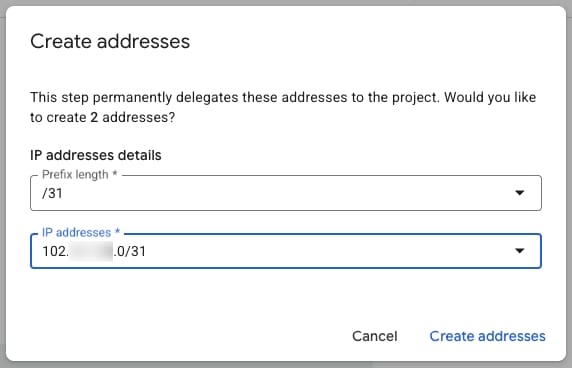
Here I'm creating 2 addresses from a /31 block. Once created, these addresses become available for use with Compute Engine instances, load balancers, and other Google Cloud resources within that project.
Using BYOIP Addresses with Compute Engine
With your addresses provisioned and delegated, using them with Compute Engine instances is straightforward. When creating a VM instance, navigate to the Networking section and expand the network interface settings. Under "External IPv4 address", you'll see your BYOIP addresses listed alongside the usual options.
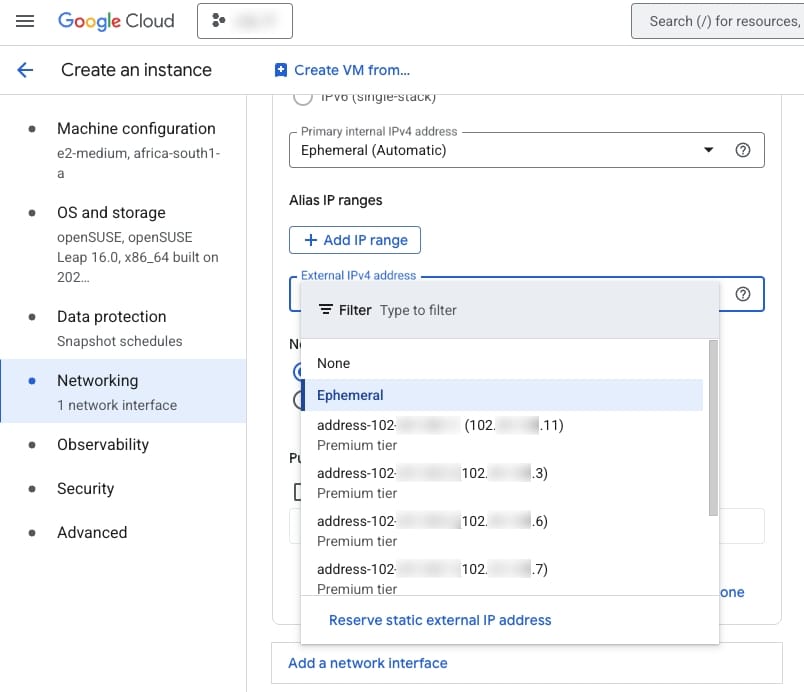
Notice in the screenshot that the BYOIP addresses (the 102.x.x.x addresses) appear in the dropdown with "Premium tier" — these are your AFRINIC-allocated addresses now usable directly on Google Cloud! Also notice the machine is being created in africa-south1-a and running openSUSE Leap 16.0. 😉
The address behaves exactly like any Google-provided address — you can assign it to VM instances, use it with NAT gateways (with some limitations), and include it in firewall rules. The key differences are that your BYOIP addresses are available only to your organization, and there are no charges for idle or in-use addresses.